
Anúncios
Technology has transformed how we approach everyday tasks, and counting objects is no exception. Apps designed to count items through images now offer fast, accurate solutions for personal and professional needs alike.



Gone are the days when counting large quantities of items meant tedious manual work prone to human error. Whether you’re managing inventory in a warehouse, organizing a collection at home, or conducting field research, image-based counting apps leverage artificial intelligence and computer vision to deliver results in seconds.
Anúncios
These innovative tools have become indispensable across various industries and personal applications. From retail businesses tracking stock to hobbyists cataloging stamps or coins, the ability to snap a photo and receive an instant count has revolutionized efficiency and accuracy.
🤖 How Image-Based Counting Technology Works
At the core of these applications lies sophisticated computer vision technology powered by machine learning algorithms. When you capture a photo of objects, the app processes the image through multiple layers of analysis to identify, separate, and count individual items.
Anúncios
The technology typically employs edge detection to distinguish object boundaries, pattern recognition to identify similar items, and neural networks trained on millions of images to understand what constitutes a single countable unit. Advanced apps can even differentiate between overlapping objects and handle various lighting conditions.
Modern counting apps utilize both on-device processing and cloud-based AI engines. On-device processing ensures privacy and works offline, while cloud solutions offer more computational power for complex counting scenarios involving thousands of items or intricate patterns.
📱 Key Features to Look for in Counting Apps
Not all counting applications are created equal. The best solutions offer a combination of accuracy, speed, and user-friendly interfaces that make the counting process seamless regardless of your technical expertise.
Accuracy and Precision
The primary consideration should always be accuracy. Top-tier apps boast precision rates above 95% even in challenging conditions. Look for applications that allow manual adjustment when the automated count needs refinement, giving you both convenience and control.
Some apps provide confidence scores alongside their counts, indicating how certain the algorithm is about the results. This transparency helps users decide when to trust the automated count and when manual verification might be necessary.
Multiple Counting Modes
Versatile applications offer different counting methods tailored to specific scenarios. Template matching works well for uniform objects like pills or screws, while AI-based detection handles irregular items such as fruits or components with varying shapes.
Manual marking mode allows users to tap on items the app might have missed, ensuring no object goes uncounted. Grid-based counting helps with regularly arranged items, while freeform detection tackles randomly distributed objects.
Save and Export Capabilities
Professional-grade counting apps let you save counted images with annotations, export data to spreadsheets, and maintain historical records. This functionality proves invaluable for inventory management, research documentation, or quality control processes.
🏪 Real-World Applications Across Industries
The versatility of image-based counting technology has made it valuable across numerous sectors, each benefiting from faster, more accurate enumeration of physical objects.
Retail and Inventory Management
Retail businesses use counting apps to streamline stocktaking processes that traditionally consumed hours of employee time. Store managers can photograph shelves and instantly know how many units remain, enabling timely reordering and preventing stockouts.
Warehouse operations particularly benefit from this technology, where counting pallets, boxes, or individual items becomes exponentially faster. The accuracy improvements also reduce discrepancies between physical counts and database records.
Agriculture and Farming
Farmers employ counting apps to estimate crop yields by photographing sample areas and extrapolating total production. Livestock management becomes simpler when counting animals in pastures or monitoring hatching rates in poultry operations.
Pest management also benefits, as agricultural specialists can document and count pest populations to determine treatment necessity and effectiveness without time-consuming manual tallying.
Healthcare and Pharmaceuticals
Medical facilities use these applications to verify pill counts in medication dispensing, ensuring patients receive correct dosages. Pharmacies can quickly inventory medications, reducing counting errors that could have serious health implications.
Research laboratories employ counting technology for cell analysis, bacterial colony enumeration, and sample verification, accelerating scientific processes that once required tedious microscope work.

Events and Crowd Management
Event organizers utilize counting apps to estimate attendance at gatherings, concerts, or public demonstrations. Aerial photographs processed through counting algorithms provide rapid attendance figures without manual headcounts.
Security personnel can monitor crowd density in real-time, identifying areas where congestion might pose safety risks and enabling proactive crowd management interventions.
💡 Tips for Getting the Most Accurate Counts
While counting apps are powerful tools, following best practices ensures you achieve optimal results consistently. Small adjustments in how you capture images can dramatically improve counting accuracy.
Optimize Your Lighting
Good lighting makes the difference between perfect counts and frustrating inaccuracies. Natural daylight works best, but if using artificial light, ensure even illumination without harsh shadows that might obscure object boundaries.
Avoid backlighting situations where objects appear as silhouettes. Side lighting can create helpful contrast but watch for shadows that might be counted as separate objects.
Camera Angle and Distance
Photograph objects from directly above when possible, creating a flat plane that minimizes perspective distortion. This overhead angle prevents objects in the background from appearing smaller than those in the foreground.
Maintain consistent distance from the objects being counted. Getting too close might result in items falling outside the frame, while excessive distance reduces the detail needed for accurate identification.
Arrange Items When Possible
While advanced apps can handle overlapping objects, spreading items out in a single layer significantly improves accuracy. If counting large quantities, consider photographing in batches rather than attempting to capture everything in one image.
Using contrasting backgrounds helps objects stand out. Place light-colored items on dark surfaces and vice versa to give the app clear visual boundaries to detect.
🔧 Advanced Features That Set Premium Apps Apart
As the technology matures, leading counting applications have introduced sophisticated features that extend beyond basic enumeration, offering comprehensive solutions for complex counting challenges.
Batch Processing and Automation
Professional versions often include batch processing capabilities, allowing users to upload multiple images and receive counts for all simultaneously. This feature proves essential when dealing with extensive inventories or research projects involving hundreds of samples.
Automation rules can be established to handle recurring counting tasks, with the app learning from corrections and improving accuracy over time through machine learning adaptation.
Integration with Business Systems
Enterprise-grade counting apps integrate seamlessly with inventory management systems, ERPs, and databases. Counted quantities automatically update stock levels, trigger reorder notifications, or populate reports without manual data entry.
API access enables developers to incorporate counting functionality into custom applications, creating tailored solutions for industry-specific requirements.
Collaborative Features
Team-based applications allow multiple users to access shared counting projects, with role-based permissions controlling who can count, verify, or approve results. This collaborative approach works well for quality control processes requiring multiple verification stages.
Cloud synchronization ensures all team members work with current data, while audit trails document who counted what and when, providing accountability in professional settings.
🌍 Environmental and Efficiency Benefits
Beyond convenience and accuracy, image-based counting applications contribute to sustainability efforts and operational efficiency in ways that extend far beyond simple time savings.
Reducing paper usage stands out as an immediate environmental benefit. Traditional counting often involves tally sheets, clipboards, and printed inventories. Digital counting eliminates these paper trails while creating searchable, permanent records.
Labor efficiency translates to reduced energy consumption as tasks that once required multiple employees working extended hours can now be completed by one person in a fraction of the time. This efficiency means fewer lights burning, less HVAC usage, and lower overall facility energy demands.
Improved inventory accuracy prevents overordering, reducing waste from expired products or obsolete stock. Businesses maintain leaner inventories while ensuring availability, striking the optimal balance between supply and demand.
🚀 The Future of Counting Technology
As artificial intelligence continues evolving, counting applications will become even more capable, accurate, and integrated into daily workflows across industries and personal applications.
Augmented Reality Integration
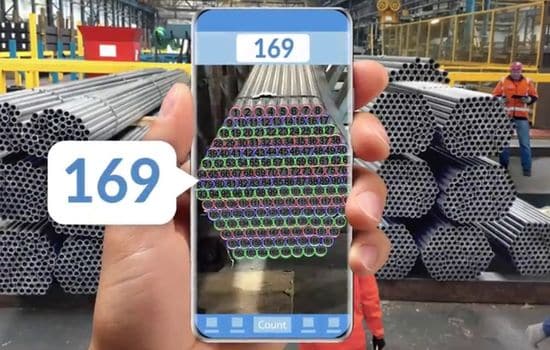
Emerging AR-enabled counting apps overlay count information directly onto live camera feeds, highlighting counted objects in real-time and displaying running totals as you pan across large areas. This immersive experience makes verification intuitive and immediate.
AR annotations can persist in space, allowing users to mark and count items across multiple sessions without losing track of what’s been tallied previously.
3D Depth Sensing
Smartphones equipped with LiDAR and depth sensors enable apps to understand three-dimensional space, dramatically improving accuracy when counting stacked, overlapping, or irregularly arranged objects.
Volume calculations become possible alongside counts, providing weight estimates based on object density assumptions and helping with logistics planning.
Specialized Recognition Models
Industry-specific counting apps will feature AI models trained exclusively on relevant objects. A construction app might excel at counting rebar or bricks, while a numismatic application could identify and count coins by denomination simultaneously.
These specialized models will deliver near-perfect accuracy within their domains, becoming indispensable professional tools rather than general-purpose utilities.
🎯 Choosing the Right App for Your Needs
With numerous counting applications available, selecting the one that best fits your requirements involves considering several factors beyond basic functionality.
Start by identifying your primary use case. Occasional personal counting needs differ greatly from professional inventory management requirements. Free versions often suffice for casual users, while businesses benefit from paid tiers offering advanced features and support.
Evaluate accuracy through trial periods offered by most quality apps. Test with objects you’ll actually be counting, under realistic conditions you’ll encounter regularly. An app that excels with coins might struggle with produce, and vice versa.
Consider the learning curve and interface design. The most powerful app becomes useless if your team finds it too complex to adopt. Intuitive interfaces with minimal training requirements ensure actual usage rather than abandoned installations.
Data privacy matters, especially in commercial settings. Understand whether images are processed locally or uploaded to external servers, and review privacy policies to ensure compliance with industry regulations.
📊 Measuring ROI and Impact
For businesses considering implementing counting apps, quantifying the return on investment helps justify adoption and measure success post-implementation.
Time savings provide the most immediate and measurable benefit. Document how long current counting processes take, then compare against app-assisted counting. The hours saved translate directly to labor cost reductions or capacity for other value-adding activities.
Accuracy improvements reduce costly errors like shipping wrong quantities, ordering excess inventory, or experiencing stockouts that disappoint customers. Track error rates before and after implementation to quantify this benefit.
Employee satisfaction often improves when tedious manual counting is eliminated, potentially reducing turnover and the associated recruitment costs. Survey team members about their experience with the technology.
🛡️ Overcoming Common Challenges
Despite their sophistication, counting apps occasionally face limitations that users should understand and know how to address.
Challenging lighting conditions remain problematic even for advanced algorithms. Carrying a portable LED light panel or simply adjusting when you perform counts can overcome this limitation.
Extremely dense or overlapping objects push current technology’s boundaries. In such cases, physically separating items before photographing or counting in smaller batches provides workarounds until AI capabilities advance further.
Non-uniform objects with significant variation in size, shape, or color may confuse algorithms trained on more consistent items. Manual verification and correction features help ensure accuracy until you’ve trained the app with enough examples.
✨ Maximizing Long-Term Value
Getting the most from counting technology involves more than downloading an app and snapping photos. Strategic implementation creates lasting value and continuous improvement.
Establish standard operating procedures for how and when counting occurs. Consistency in methodology improves results and makes data comparable over time, revealing trends and patterns.
Regularly update the application to benefit from improvements, new features, and enhanced accuracy from refined algorithms. Developers continuously train AI models with more diverse datasets, incrementally improving performance.
Provide feedback to developers when you encounter inaccuracies or challenging scenarios. User reports help improve future versions, and responsive developers may prioritize features that benefit your specific use case.
Integrate counting data with broader analytics efforts, identifying patterns in inventory turnover, seasonal variations, or efficiency trends that inform strategic decisions beyond simple enumeration.
The evolution of image-based counting technology represents a significant leap forward in how we approach a fundamental task humans have performed for millennia. By combining smartphone ubiquity with artificial intelligence sophistication, these apps deliver professional-grade counting capabilities to anyone with a mobile device. Whether you’re managing business inventory, organizing personal collections, or conducting scientific research, the right counting app transforms a tedious necessity into a quick, accurate process that saves time and reduces errors. As the technology continues advancing, the gap between human counting and AI-assisted enumeration will only widen, making these tools increasingly essential for anyone who regularly needs to know “how many.”
