
Anúncios
Is your phone running slow, storage full, and apps crashing unexpectedly? A file cleaning app might be exactly what you need to restore your device’s performance and free up valuable space.



Modern smartphones have become digital repositories of our entire lives—photos, videos, apps, documents, and countless temporary files that accumulate over time. Without proper maintenance, these files can consume precious storage space and significantly impact your device’s performance.
Anúncios
The good news is that specialized cleaning apps have evolved tremendously, offering intelligent solutions that go beyond simple file deletion. They analyze your storage patterns, identify redundant data, and optimize system resources with just a few taps. Let’s explore everything you need to know about choosing and using the right cleaning app for your mobile device.
📱 Why Your Phone Needs Regular Cleaning
Every time you browse the internet, use social media, or download an app, your phone stores temporary files, cache data, and metadata. These “digital leftovers” serve a purpose initially—they help apps load faster and remember your preferences. However, they accumulate rapidly and often remain on your device long after they’re useful.
Anúncios
Over time, this digital clutter creates a domino effect. Your phone’s storage fills up, causing apps to malfunction, photos to fail saving, and system updates to become impossible. Performance degrades noticeably, with longer loading times, increased battery drain, and frequent freezing. A cleaning app addresses these issues systematically, identifying and removing unnecessary files while preserving important data.
🔍 What Cleaning Apps Actually Remove
Understanding what these apps clean helps you appreciate their value and use them more effectively. Here are the primary categories of files that accumulate on your device:
Cache Files and Temporary Data
Apps store temporary information to improve loading speeds and user experience. While helpful initially, cache files from browsers, social media platforms, and streaming services can occupy gigabytes of space. Cleaning apps safely remove outdated cache without affecting app functionality, as these files regenerate naturally when needed.
Duplicate Photos and Videos
We often take multiple shots of the same scene, download images from messaging apps, or accidentally save duplicates. These identical or similar files waste enormous storage space. Advanced cleaning apps use image recognition technology to detect duplicates and near-duplicates, allowing you to keep only the best versions.
Residual Files from Uninstalled Apps
When you uninstall an app, not everything gets removed. Configuration files, logs, and data folders often remain hidden in your system. These “app leftovers” serve no purpose but continue occupying space indefinitely. Cleaning apps specialize in identifying and eliminating these residual files completely.
Large and Rarely Used Files
Old videos, downloaded PDFs, archived documents, and forgotten audio files tend to hide in various folders. Cleaning apps scan your entire storage system, presenting these space-hogging files in an organized manner so you can decide what to keep or delete based on size and last access date.
🌟 Key Features to Look For in a Cleaning App
Not all cleaning apps are created equal. The best ones combine powerful functionality with user-friendly design and respect for your privacy. Consider these essential features when choosing your cleaning solution:
Intelligent Scanning Technology
Top-tier cleaning apps employ smart algorithms that distinguish between safe-to-delete files and important data. They analyze file types, creation dates, access patterns, and relationships between files to provide accurate recommendations without risking data loss.
Customizable Cleaning Options
While automatic cleaning is convenient, having granular control matters. Quality apps let you review exactly what will be deleted, customize scanning parameters, and set exclusion rules for specific files or folders you want to protect.
Storage Analysis and Visualization
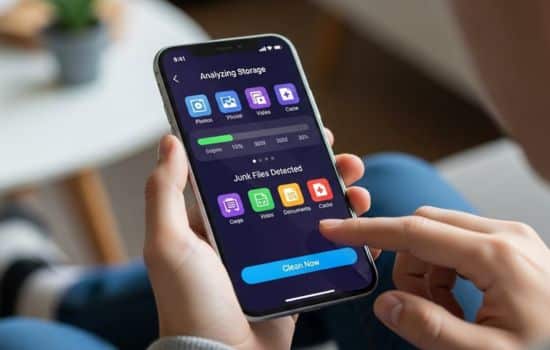
Understanding where your storage goes empowers better decision-making. Look for apps that provide clear visual breakdowns—charts, graphs, and categorized lists showing exactly how your storage is distributed across apps, media, documents, and system files.
Privacy and Security Protections
Since cleaning apps access your entire file system, trustworthy security practices are non-negotiable. Choose apps from reputable developers with transparent privacy policies, preferably those that process data locally rather than uploading information to external servers.

🚀 How Cleaning Apps Improve Phone Performance
The benefits of regular phone cleaning extend far beyond simply freeing up storage space. These apps optimize multiple aspects of your device’s operation, creating a noticeably smoother and more responsive user experience.
Faster App Loading and Responsiveness
When storage approaches capacity, your phone’s operating system struggles to manage files efficiently. Apps take longer to open, switching between programs becomes sluggish, and overall responsiveness suffers. By maintaining adequate free space—ideally at least 15-20% of total capacity—cleaning apps help your device run at optimal speed.
Extended Battery Life
Excessive background processes, redundant cache operations, and system strain from limited storage all contribute to increased battery consumption. Cleaning apps reduce these unnecessary activities, allowing your battery to last longer between charges and potentially extending its overall lifespan.
Smoother System Updates
Operating system and security updates require temporary storage space to download and install. If your device lacks sufficient free space, updates fail or become impossible. Regular cleaning ensures you can always install critical updates that protect your device and add new features.
💡 Best Practices for Using Cleaning Apps
Maximizing the benefits of your cleaning app requires understanding how to use it effectively and establishing healthy maintenance routines.
Establish a Regular Cleaning Schedule
Rather than waiting until your phone becomes unbearably slow, schedule routine cleanings. For most users, a thorough cleaning every two weeks strikes the right balance. Heavy users who frequently download content, take photos, or use numerous apps might benefit from weekly sessions.
Review Before Deleting
While automatic cleaning is tempting, taking a few moments to review what will be deleted prevents accidental loss of important files. Most quality apps present clear previews and allow you to exclude specific items from deletion. This review process also helps you understand your storage habits better.
Backup Important Data First
Before performing major cleanups, especially your first one with a new app, ensure your important photos, videos, documents, and contacts are backed up to cloud storage or your computer. This precaution provides peace of mind and protection against unexpected issues.
Combine with Manual Organization
Cleaning apps excel at removing system junk and obvious duplicates, but they can’t make subjective decisions about your personal files. Complement automated cleaning with occasional manual reviews of your photo gallery, downloads folder, and app collection. Uninstall apps you no longer use and organize files into logical folders.
⚖️ Common Myths About Phone Cleaning Apps
Several misconceptions about cleaning apps persist, causing some users to avoid them or misuse them. Let’s clarify the facts.
Myth: Cleaning Apps Harm Your Phone
Reputable cleaning apps from established developers are designed with safety as a priority. They only remove expendable files that can be safely regenerated or aren’t needed. Problems arise when users install dubious apps from unknown sources. Stick with well-reviewed apps from official app stores to ensure safety.
Myth: You Should Clean Your Phone Daily
Excessive cleaning provides diminishing returns and can actually create unnecessary work for your system. Cache files serve a purpose—they help apps load faster. Constantly deleting and regenerating them wastes processing power and battery. Bi-weekly or monthly cleaning suffices for most users.
Myth: All Cleaning Apps Are the Same
The quality, features, and safety standards of cleaning apps vary dramatically. While basic functionality may seem similar, the algorithms that determine what to clean, the user interface design, privacy practices, and additional features like storage analysis or app management differ significantly between products.
🔐 Privacy Considerations When Using Cleaning Apps
Granting a cleaning app access to your files requires trust. Understanding privacy implications helps you make informed decisions and protect your personal information.
Understand Required Permissions
Cleaning apps legitimately need storage access to scan and delete files. However, be wary of apps requesting unrelated permissions like contacts, microphone, or location access. These permissions aren’t necessary for cleaning functionality and may indicate data collection practices beyond the app’s stated purpose.
Research the Developer
Before installing any cleaning app, research the developer’s reputation. Look for established companies with clear privacy policies, positive user reviews, and transparent business practices. Check whether they’ve been involved in privacy controversies or data breaches.
Review Data Handling Practices
Quality cleaning apps perform operations locally on your device without uploading file information to external servers. Read the privacy policy to understand whether the app collects usage data, shares information with third parties, or requires account creation and personal information.
📊 Measuring the Impact of Regular Cleaning
Tracking the benefits of your cleaning routine helps maintain motivation and demonstrates the tangible value of this maintenance practice.
Monitor Storage Trends
Most phones include built-in storage analysis tools. Before cleaning, note your available storage. After cleaning, record the space freed. Over time, you’ll see patterns showing which types of files accumulate fastest and how much space regular cleaning recovers.
Notice Performance Improvements
Pay attention to subjective performance metrics—how quickly apps open, how responsive your interface feels, and whether you experience freezing or crashes. Most users report noticeable improvements after their first thorough cleaning, especially if storage was severely limited.
Track Battery Statistics
Your phone’s battery settings show usage patterns over time. After establishing a cleaning routine, monitor whether your battery lasts longer between charges. While cleaning isn’t a miracle solution for battery problems, reducing system strain often produces measurable improvements.
🎯 Choosing the Right Cleaning App for Your Needs
With countless options available, selecting the ideal cleaning app depends on your specific requirements, technical comfort level, and device characteristics.
For Beginners: Simplicity and Automation
If you’re new to phone maintenance or prefer minimal involvement, choose apps with one-tap cleaning functionality and automatic recommendations. These user-friendly options handle complex decisions behind the scenes, presenting simple choices and clear explanations of what they’re doing.
For Power Users: Advanced Control
Technically inclined users often prefer apps offering detailed file lists, custom exclusion rules, and advanced options like app management, file compression, or scheduled automated cleaning. These feature-rich tools provide maximum control over exactly what happens during cleaning operations.
For Privacy-Conscious Users: Local Processing
If privacy is your primary concern, prioritize apps that explicitly state they process all data locally, require minimal permissions, don’t include tracking analytics, and come from developers with strong privacy reputations. Open-source options, when available, offer the highest transparency.
🌐 Beyond Basic Cleaning: Additional Features Worth Considering
Modern cleaning apps often include supplementary tools that extend their utility beyond simple file deletion.
App Management and Analysis
Some cleaning apps provide detailed information about installed applications—their storage consumption, last use date, and battery impact. This intelligence helps identify apps worth uninstalling and reveals surprising storage hogs you might not have suspected.
Media Compression Tools
Rather than deleting photos and videos, some apps offer compression features that reduce file sizes while maintaining acceptable quality. This approach lets you keep memories while significantly reducing their storage footprint.
File Organization Assistance
Advanced cleaning solutions include file management features that help organize scattered downloads, create logical folder structures, and move rarely accessed files to external storage or cloud services.
✨ Making Cleaning Part of Your Digital Wellness Routine
Just as we maintain physical spaces, our digital environments benefit from regular attention and organization. Incorporating phone cleaning into broader digital wellness practices creates lasting benefits beyond storage management.
Consider phone cleaning a form of digital decluttering that reduces stress, improves focus, and creates a more intentional relationship with technology. When your device runs smoothly, contains only apps you actually use, and stores content that matters, your entire mobile experience becomes more satisfying and purposeful.
Set calendar reminders for bi-weekly cleaning sessions. Combine these sessions with brief reviews of your app collection, notification settings, and digital consumption habits. This holistic approach transforms routine maintenance into an opportunity for mindful technology use.
🏆 The Long-Term Value of Consistent Maintenance
Regular cleaning extends your phone’s useful lifespan, potentially delaying expensive upgrades and reducing electronic waste. Devices maintained properly often perform adequately for years longer than neglected counterparts, providing both financial savings and environmental benefits.
Beyond practical advantages, maintaining a well-organized, efficiently running phone reduces daily frustrations and improves your overall relationship with technology. When your device responds instantly, always has space for new photos, and never interrupts important moments with storage warnings, it truly serves as the helpful tool it’s meant to be rather than a source of stress.
Investing a few minutes every couple of weeks in proper phone maintenance pays dividends in performance, reliability, and peace of mind. With the right cleaning app and consistent habits, you’ll enjoy a faster, more spacious, and more responsive device that meets your needs reliably for years to come. 📲✨
