
Anúncios
Calculator apps have become essential tools in our digital lives, transforming complex mathematical operations into simple taps on our smartphone screens.



From basic arithmetic to advanced scientific calculations, these digital companions have evolved far beyond the traditional pocket calculators of yesteryear. Whether you’re splitting bills at a restaurant, calculating mortgage payments, or solving complex engineering equations, there’s a calculator app designed specifically for your needs.
Anúncios
The modern calculator app landscape offers an impressive variety of options, each with unique features tailored to different user groups. Students, professionals, and casual users alike can benefit from understanding what makes a great calculator app and how to choose the right one for their specific requirements. Let’s explore everything you need to know about calculator applications in today’s mobile-first world. 📱
Why Traditional Calculators Are Becoming Obsolete
The physical calculator that once occupied a permanent spot in desk drawers and backpacks is steadily losing ground to its digital counterpart. This shift isn’t just about convenience—it’s about capability and accessibility.
Anúncios
Smartphones have become our constant companions, always within arm’s reach. Having a calculator built into the same device we use for communication, entertainment, and work eliminates the need to carry separate gadgets. Modern calculator apps also receive regular updates, adding new features and fixing bugs without requiring hardware replacement.
Beyond basic portability, calculator apps offer functionalities that physical devices simply cannot match. They can store calculation history, sync across multiple devices, integrate with other apps, and even solve equations through camera recognition. The digital format also means zero battery anxiety for the calculator function itself—your phone’s battery powers everything.
Essential Features Every Quality Calculator App Should Have
Not all calculator apps are created equal. While the basic four-function calculator meets simple needs, a truly excellent app offers much more. Understanding these key features helps you identify which applications deserve space on your home screen.
Intuitive User Interface: The layout should be clean, with buttons large enough for accurate tapping. Color coding for different operation types enhances usability, and the display should clearly show both your input and results without cluttering the screen.
Calculation History: This underrated feature allows you to review previous calculations, catch errors, and reuse numbers without re-entering them. The best apps let you tap any historical calculation to bring it back for editing or further operations.
Scientific Functions: Even if you’re not solving differential equations daily, having access to trigonometric functions, logarithms, and exponents proves valuable surprisingly often. These capabilities should be easily accessible without overwhelming casual users.
Unit Conversion: Premium calculator apps integrate conversion tools for currency, measurements, temperature, and more. This integration saves time by eliminating the need to switch between different apps for related tasks. 🔄
Different Types of Calculator Apps for Different Needs
The calculator app ecosystem has diversified significantly, with specialized applications serving niche audiences. Recognizing which category fits your primary use case ensures you select the most appropriate tool.
Basic Calculators for Everyday Math
These stripped-down applications focus on fundamental arithmetic operations. They’re perfect for quick calculations like splitting checks, determining tips, or adding up shopping expenses. Their simplicity is their strength—no learning curve, no unnecessary features, just instant access to basic math functions.
The built-in calculator apps on both Android and iOS devices fall into this category and serve most casual users adequately. They open instantly, work offline, and accomplish straightforward tasks without fuss.
Scientific Calculators for Students and Researchers
Scientific calculator apps replicate the functionality of devices like the Texas Instruments TI-84, offering advanced mathematical operations essential for higher education and technical professions. These include trigonometric functions, statistical calculations, matrix operations, and graphing capabilities.
Students particularly benefit from these apps during coursework, though it’s important to verify whether your educational institution permits smartphone use during examinations. Many schools maintain policies requiring physical calculators for testing situations. 📚
Financial Calculators for Business and Investment
Specialized financial calculator apps help with loan amortization, investment returns, retirement planning, and business valuation. They incorporate time-value-of-money calculations, making them indispensable for financial professionals, real estate agents, and anyone making significant financial decisions.
These applications often include templates for common calculations like mortgage payments, bond yields, or break-even analysis, streamlining complex financial math into user-friendly interfaces.
Graphing Calculators for Visual Learners
Graphing calculator apps visualize mathematical functions, allowing users to see equations as curves and shapes. This visual representation enhances understanding, particularly for calculus, physics, and engineering students who need to grasp how equations behave across different values.
Modern graphing apps support 2D and 3D plotting, interactive manipulation of graphs, and the ability to overlay multiple functions for comparison. Some even animate functions to show how changes in variables affect the overall equation. 📊

Top Calculator Apps Worth Downloading in 2024
With thousands of calculator apps flooding app stores, identifying the truly exceptional ones saves time and frustration. These standout applications have earned their reputation through reliability, feature richness, and user satisfaction.
Google Calculator: Pre-installed on most Android devices, this free app strikes an excellent balance between simplicity and functionality. It handles basic arithmetic smoothly while offering scientific functions through a simple swipe. The Material Design interface feels native to Android, and the calculation history feature works flawlessly.
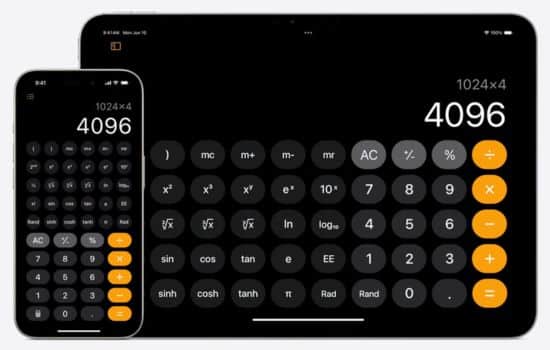
Apple Calculator: iOS users receive Apple’s built-in calculator, which adopts the same minimalist philosophy as other Apple applications. Rotating your iPhone from portrait to landscape mode reveals scientific functions—a clever space-saving design decision. While it lacks calculation history, its seamless integration with the iOS ecosystem makes it reliable and fast.
CalcBot: This third-party option for iOS devices adds personality to calculations with delightful animations and sound effects. Beyond aesthetics, it offers genuine utility through conversion tools, tip calculation, and an excellent tape-style history that mimics classic adding machines. The free version serves most users well, while a premium upgrade removes ads.
RealCalc Scientific Calculator: Android users seeking advanced functionality without complexity appreciate RealCalc. It replicates traditional scientific calculators with impressive accuracy, supporting various number systems (binary, hexadecimal), fraction calculations, and extensive customization options. The free version includes ads, but they’re non-intrusive.
Desmos Graphing Calculator: Available for both platforms, Desmos revolutionizes graphing with its intuitive interface and powerful capabilities. Students can visualize functions instantly, create tables of values, and even use sliders to animate graphs. Best of all, it’s completely free without ads—a rare find in the app world. ✨
Privacy Considerations When Choosing Calculator Apps
It might seem paranoid to worry about privacy in a calculator app, but some developers have been caught collecting unnecessary user data. Understanding what permissions an app requests and why helps protect your personal information.
A legitimate calculator app requires minimal permissions. It doesn’t need access to your contacts, camera (unless it offers equation scanning), microphone, or location. Apps requesting these permissions without clear justification should raise red flags.
Free calculator apps often display advertisements, which is a reasonable trade-off. However, the advertising networks they use may track your behavior across apps and websites. Reading privacy policies—admittedly tedious—reveals what data gets collected and how it’s used. Opting for well-established apps from reputable developers generally offers better privacy protection than obscure alternatives.
For maximum privacy, stick with the calculator app pre-installed on your device. Apple and Google have substantial reputations to protect, making them less likely to abuse user data through their built-in utilities.
Maximizing Productivity with Calculator App Shortcuts
Power users can dramatically improve their calculation efficiency by learning keyboard shortcuts and hidden features. These time-savers transform a simple app into a productivity powerhouse. ⚡
Most calculator apps support copy-and-paste functionality, allowing you to extract numbers from emails or documents and paste them directly into your calculations. Similarly, you can copy results and paste them into other applications without manual retyping—a huge time-saver during data entry.
Many apps let you swipe to delete the last digit entered, which is faster than clearing the entire input and starting over. This gesture-based editing feels natural after a short adjustment period and reduces frustration when you mistype a single number in a long equation.
Widget support on both Android and iOS enables one-tap access to calculator functions directly from your home screen. Instead of opening the full app, you can perform quick calculations through the widget interface, perfect for those moments when you need an instant answer.
Advanced Calculator Apps for Specialized Professions
Beyond general-purpose applications, certain professions benefit from highly specialized calculator apps designed around their unique requirements. These niche tools incorporate industry-specific formulas and workflows that generic calculators cannot match.
Construction and Engineering: Apps like ConcreteCalc and Construction Master help contractors calculate material quantities, angles, and dimensions. They understand construction units and can convert between measurement systems commonly used on job sites.
Healthcare: Medical professionals use specialized apps to calculate drug dosages based on patient weight, determine BMI, estimate kidney function, and compute various clinical scores. These calculators reduce the risk of calculation errors in critical healthcare situations. 🏥
Cooking and Nutrition: Recipe scaling calculators help home chefs adjust ingredient quantities when cooking for different numbers of people. Nutrition calculators allow users to determine caloric content and macronutrient ratios for meal planning and dietary management.
Photography: Photographers use depth-of-field calculators to determine optimal aperture settings, hyperfocal distance calculators for landscape photography, and exposure calculators for film photography. These specialized tools account for sensor size, focal length, and other photographic variables.
The Future of Calculator Applications
Calculator apps continue evolving, incorporating cutting-edge technology that seemed like science fiction just years ago. Understanding these emerging trends offers a glimpse into where this essential tool category is headed.
Artificial Intelligence Integration: AI-powered calculators can now interpret natural language queries. Instead of manually entering “15% of 200,” you can type or speak “what’s fifteen percent of two hundred” and receive the answer instantly. This conversational interface lowers the barrier to complex calculations. 🤖
Augmented Reality Features: Some experimental apps use AR to measure physical objects through your camera and automatically perform calculations based on those measurements. Point your phone at a room, and the app calculates square footage; aim at a cylindrical container, and it determines volume.
Cloud Synchronization: Premium calculator apps increasingly offer cloud backup of calculation history and custom functions, allowing seamless transitions between phone, tablet, and computer. Your work follows you across devices without manual transfers.
Handwriting Recognition: Advanced apps can now recognize handwritten equations through your touchscreen or stylus, converting your natural writing into digital calculations. This bridges the gap between traditional paper-and-pencil math and digital convenience.
Making the Right Choice for Your Calculator App Needs
Selecting the perfect calculator app doesn’t require exhaustive research—just a clear understanding of your primary use cases. Start with your device’s built-in option and evaluate whether it meets your needs before exploring alternatives.
For students, prioritize apps that match your coursework requirements. Verify compatibility with any standardized tests you’ll take, and consider apps that offer educational features like step-by-step solutions. Many premium apps provide this functionality through subscription services.
Professionals should seek apps that integrate with their existing workflows. Financial calculators that export results to spreadsheet formats, scientific calculators that support programmable functions, or specialty calculators designed for their specific industry will provide the best return on investment—whether that investment is money for premium features or time learning advanced functions.
Casual users are often best served by simple, free options with minimal learning curves. The built-in calculators on modern smartphones handle everyday arithmetic flawlessly, and downloading additional apps may only create unnecessary clutter. 🎯
Troubleshooting Common Calculator App Issues
Even the most polished apps occasionally misbehave. Knowing how to resolve common calculator app problems saves frustration and maintains your productivity.
Inaccurate Results: If your calculator provides obviously wrong answers, verify you’re using the correct order of operations. Many people forget that multiplication and division occur before addition and subtraction. Using parentheses to group operations explicitly eliminates ambiguity.
App Crashes: Persistent crashing often stems from outdated app versions or insufficient device storage. Check for updates in your app store, and clear cached data through your phone’s settings menu. If problems persist, uninstalling and reinstalling the app usually resolves software glitches.
Missing Features: Some calculator apps hide advanced functions behind gesture controls or menu options. Consult the app’s help documentation or settings menu to discover hidden capabilities. Rotating your device between portrait and landscape orientations often reveals additional buttons and functions.
Slow Performance: Calculator apps should respond instantly to input. Lag typically indicates background processes consuming device resources. Close unnecessary apps, restart your phone, or consider replacing an aging device if performance issues are widespread across multiple applications.
Calculator Apps as Educational Tools
Beyond simply computing answers, modern calculator apps serve as powerful learning aids that help users understand mathematical concepts at deeper levels. This educational dimension adds value far beyond basic calculation capabilities.
Many advanced apps provide step-by-step solutions, showing the work required to reach an answer rather than just displaying the final result. This transparency helps students identify where their understanding breaks down and reinforces proper problem-solving techniques.
Interactive graphing features allow learners to experiment with equations, immediately seeing how changing variables affects outcomes. This hands-on exploration builds intuitive understanding that passive reading cannot match. Students can manipulate sliders to adjust coefficients and watch graphs transform in real-time, revealing relationships between algebraic expressions and their visual representations. 📈
Some educational calculator apps include built-in tutorials, practice problems, and quizzes. These integrated learning resources transform a calculation tool into a comprehensive study platform, particularly valuable for self-directed learners who need additional support outside classroom hours.
Accessibility Features in Modern Calculator Applications
Inclusive design ensures calculator apps serve users with varying abilities. The best applications incorporate accessibility features that make mathematics available to everyone, regardless of physical limitations.
Voice control integration allows users with limited mobility to perform calculations through speech commands. Combined with screen reader compatibility, these features ensure visually impaired users can access calculator functionality just as easily as sighted users.
Adjustable font sizes, high-contrast color schemes, and haptic feedback improve usability for users with vision impairments or motor control challenges. These thoughtful design choices demonstrate that powerful functionality and accessibility aren’t mutually exclusive.
Some apps offer alternative input methods beyond traditional button layouts, including swipe gestures, handwriting recognition, and equation photography. This variety ensures users can interact with the calculator in whatever manner best suits their individual needs and preferences. ♿
The Environmental Impact of Going Digital
Choosing calculator apps over physical devices represents a small but meaningful step toward environmental sustainability. While this benefit rarely factors into purchasing decisions, it’s worth acknowledging the positive impact of digital alternatives.
Physical calculators require raw materials for manufacture, energy for production, and transportation to reach consumers. They eventually become electronic waste when they break or become obsolete. Calculator apps, conversely, add negligible environmental burden—they’re just software on devices people already own.
The extended lifespan of calculator apps also deserves recognition. While physical calculators might serve reliably for years, they cannot receive upgrades or new features. Apps evolve continuously through updates, maintaining relevance and utility far beyond what hardware allows. This longevity reduces the consumption cycle that drives environmental degradation.
By consolidating multiple tools into a single device, smartphones reduce overall resource consumption. Instead of carrying a phone, calculator, camera, flashlight, and various other gadgets separately, we accomplish all these functions through one device. This convergence represents meaningful progress toward sustainable technology use. 🌱
Wrapping Up Your Calculator App Journey
Calculator apps have evolved from simple digital replacements for physical devices into sophisticated tools that enhance how we interact with mathematics. Whether you need basic arithmetic, advanced scientific functions, or specialized calculations for your profession, there’s an app perfectly suited to your requirements.
The best approach involves starting with your device’s built-in calculator and exploring additional options only when you encounter limitations. Free apps provide impressive functionality, while premium versions offer advanced features that justify their cost for frequent users with specialized needs.
As these applications continue incorporating artificial intelligence, augmented reality, and cloud capabilities, they’ll become even more powerful and intuitive. The humble calculator app represents a quiet success story in mobile technology—perpetually useful, constantly improving, and universally accessible.
Take time to explore the calculator app on your phone today. You might discover features you never knew existed, transforming this everyday tool into an even more valuable companion for your mathematical needs. 🚀
